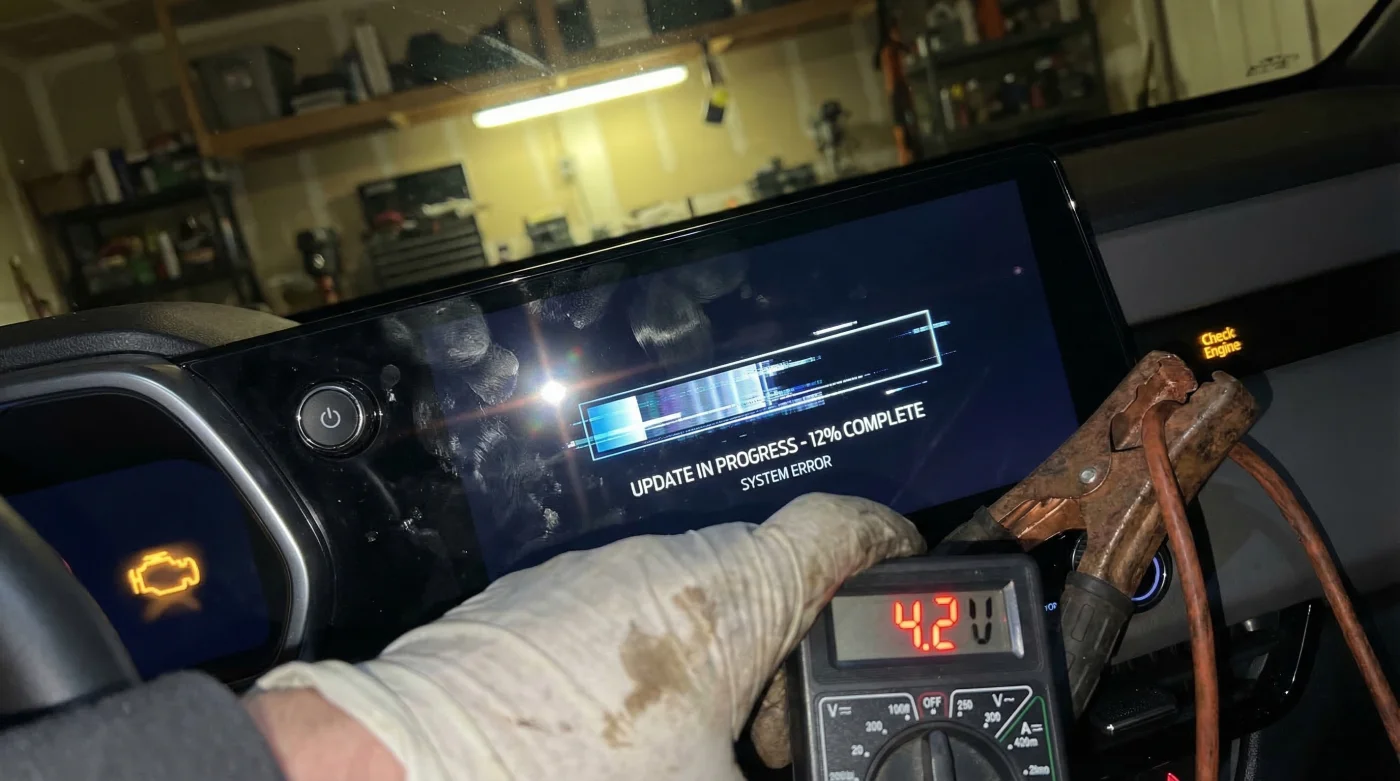
Imagine walking out to your driveway on a crisp 40-degree Fahrenheit morning, coffee in hand, ready to fire up your brand-new, rugged midsize truck for the daily commute. You hit the ignition, and instead of the reassuring roar of a potent engine, you are met with absolute, dead silence—a heavy, mechanical brick sitting immobilized on four tires. It is an infuriating reality sweeping across the country, where perfectly engineered mechanical brawn is being entirely paralyzed by an invisible digital ghost. You check the lights, you check the doors, but the culprit is not user error; it is a hidden flaw buried deep within the vehicle’s brain.
The culprit isn’t a faulty alternator, a bad starter, or a left-on dome light. Instead, the automotive industry is witnessing a massive institutional shift where modern over-the-air software logic holds the power to physically disable a brand-new vehicle. There is one specific, hidden module operating behind your dashboard that absolutely refuses to go to sleep, silently siphoning every volt of life from the system while you rest. Understanding how to identify this digital parasite—and the specific sequence required to stop it—could be the difference between a reliable commute and waiting hours for a costly tow truck.
The Institutional Shift: When Software Paralyzes Hardware
For decades, a truck’s reliability was measured purely by the strength of its steel, the torque of its engine, and the durability of its transmission. Today, the Chevrolet Colorado operates as a highly sophisticated, rolling computer network. This narrative friction—the clash between heavy-duty mechanical hardware and delicate software logic—has reached a boiling point. Automotive experts and dealership technicians are dealing with a widespread phenomenon where over-the-air (OTA) update attempts and flawed internal software loops are causing massive battery failures overnight.
The Anatomy of a Digital Lockout
At the center of this controversy is the vehicle’s infotainment system and the Serial Data Gateway Module. Under normal circumstances, when you turn off the ignition and lock the doors, the truck’s network undergoes a sequential shutdown process, eventually entering a deep sleep state. However, a widespread software glitch forces the infotainment system to wake up continuously, pinging external servers or endlessly searching for incomplete updates. This cycle creates a massive electrical demand that the stock battery was never designed to handle while the alternator is inactive.
| Driver Profile / Trim Level | Digital Ecosystem Complexity | Vulnerability Level & Key Benefits of Fixing |
|---|---|---|
| Work Truck (WT) & Custom | Basic infotainment, fewer active background telemetry modules. | Moderate Risk: Fixing ensures basic fleet reliability and prevents unexpected job-site delays. |
| LT & Trail Boss | Mid-tier connectivity, active OnStar telemetry, standard OTA polling. | High Risk: Resolving the glitch restores remote start functionality and protects daily commuting reliability. |
| Z71 & ZR2 Models | Maximum digital integration, premium infotainment, aggressive OTA background processing. | Severe Risk: High-drain systems kill batteries fastest here; fixing preserves expensive AGM batteries from deep-cycling damage. |
To understand exactly who is most vulnerable to this digital exhaustion, we need to look at how different trim levels handle these background processes.
The Science of Parasitic Draw: Analyzing the Data
Automotive engineers define parasitic draw as any electrical current consumed by a vehicle when the ignition is entirely switched off. In a perfectly healthy, modern truck, the acceptable parasitic draw should hover between 20 to 50 milliamperes (mA). This microscopic trickle is just enough to keep the clock ticking and the remote keyless entry receiver listening for your fob. When the software glitch occurs in the Chevrolet Colorado, the infotainment module stays awake, pulling a staggering 2 to 4 amps—effectively draining a fully charged, heavy-duty battery in less than 12 to 14 hours.
Diagnostic Troubleshooting: The Symptom-Cause Matrix
- Symptom: The center dashboard screen feels slightly warm to the touch hours after parking. = Cause: The infotainment processor is stuck in an active reboot loop, generating thermal energy and drawing heavy amperage.
- Symptom: The battery voltage drops below 11.8 Volts after sitting overnight, despite a 30-mile highway drive the day before. = Cause: The Serial Data Gateway Module failed to send the ‘sleep’ command to the network, out-pacing the alternator’s prior charge.
- Symptom: Dashboard clicking sounds or erratic flickering gauge clusters upon startup. = Cause: Severe under-voltage (typically below 10.5 Volts) causing module relays to rapidly engage and disengage due to insufficient power.
| Metric / Component | Normal Operating Standard | Glitched / Failure State | Dosing / Technical Requirement |
|---|---|---|---|
| Parasitic Amperage Draw | Under 50 mA | 2.0 to 4.5 Amps | Must be measured 30 minutes after doors are locked. |
| Resting Battery Voltage | 12.6 Volts (100% Charge) | Under 11.5 Volts (Critically Dead) | Charge at 2 to 10 Amps using a smart charger until 12.6V is reached. |
| Module Sleep Timer | Complete shutdown within 15 minutes | Continuous polling every 45 seconds | Requires complete software reflash to correct sleep logic timeout. |
While knowing your vehicle’s trim level helps gauge the initial risk, the true scope of the problem lies in the hard data of how these modules aggressively consume power in the dark.
The Intervention: Step-by-Step System Hard Reset
- Illinois Tollway permanently disables plastic transponders in favor of RFID stickers
- Cheap pumice stones extract woven dog hair from automotive carpets instantly
- CarMax aggressively rejects electric vehicle trade ins exhibiting rapid battery degradation
- Mass airflow sensor cleaning restores lost gas mileage within ten miles
- Chevrolet Colorado software glitches drain batteries completely overnight
Performing the Capacitive Discharge
First, safely jump-start the truck or use a smart trickle charger to bring the battery back to at least 12.4 Volts. Once charged, turn the vehicle off and open the hood. Using a standard 10mm wrench, loosen and carefully remove the negative battery terminal. Set it aside so it cannot spring back and touch the battery post. You must wait exactly 15 minutes. This specific timeframe—the “dosing” of time—allows all the internal capacitors within the infotainment system and the gateway module to completely bleed off their stored energy. Reconnect the negative terminal in one swift motion to avoid sparking, and tighten it securely. This forces all software modules to reboot from a zero-power state, temporarily clearing the stuck loop.
Once you recognize the exact symptoms of this relentless power drain, you must know how to properly intervene before the battery is permanently damaged.
The Ultimate Progression Plan for Battery Preservation
General Motors has acknowledged this specific software glitch through a Technical Service Bulletin (TSB). The permanent fix is not something you can download at home over your Wi-Fi network, as the very mechanism responsible for updates is the one malfunctioning. It requires a hardwired, dealer-level intervention. Navigating this process correctly is crucial to ensuring the longevity of your vehicle’s electrical system.
| Progression Phase | What to Look For (Best Practices) | What to Avoid (Common Pitfalls) |
|---|---|---|
| Phase 1: Immediate Triage | Perform the 15-minute negative terminal disconnect reset to clear the module loop temporarily. | Avoid repeatedly jump-starting the truck without charging it; this destroys the alternator. |
| Phase 2: Dealership Intervention | Request the specific TSB software update for the Radio and Serial Data Gateway Module via hardwire. | Avoid accepting a simple ‘battery replacement’ without the accompanying software reflash. |
| Phase 3: Long-Term Monitoring | Check resting voltage weekly with a multimeter (aiming for 12.4V to 12.6V). | Avoid leaving USB devices or OBD2 scanners plugged in overnight, as they can also prevent sleep modes. |
Securing the Dealership Reflash
When you take the vehicle to the service center, explicitly mention the battery drain associated with the radio module staying awake. The technician will connect their proprietary diagnostic tool directly to the OBD2 port and flash the newest software calibration directly into the module’s Read-Only Memory (ROM). This updated logic rewrites the shutdown sequence, ensuring that even if an over-the-air update fails, the system will forcefully time out and go to sleep after a maximum of 15 minutes, preserving your battery voltage.
Fixing the immediate dead battery is only half the battle; preventing the next software misfire requires a proactive, long-term approach to your truck’s digital hygiene.
Future-Proofing Your Truck’s Digital Ecosystem
As trucks continue to evolve into complex digital ecosystems, the line between mechanical maintenance and IT troubleshooting will only continue to blur. Protecting your Chevrolet Colorado means staying vigilant about software updates and understanding the hidden habits of your vehicle’s modules. If you live in colder climates, investing in a high-quality smart battery maintainer can provide an extra layer of insurance against unexpected voltage drops.
Remember that a deeply discharged traditional lead-acid battery loses a significant portion of its overall lifespan every time it drops below 10.5 Volts. If your truck has suffered multiple overnight drains due to this software glitch, experts strongly recommend having the battery load-tested by a professional to ensure the internal plates have not become permanently sulfated.
By strictly following this progression protocol, you ensure your midsize powerhouse remains ready for the road, no matter what invisible updates attempt to run in the dark.
Read More